Asana Cross-Project Mirror
Mirror tasks across Asana projects without duplicates: the n8n workflow that keeps the client view and the internal view in sync, both directions.
Asana Cross-Project Mirror
Every agency has two Asana projects describing the same work — the client-facing one and the internal one — and the sync between them is one intern’s memory.
This workflow mirrors tasks between two Asana projects in both directions: a client-visible task created internally appears in the client project with sanitized fields, and a client’s comment or status change flows back internally with attribution. A task ID map in a sheet keeps the two worlds permanently reconciled.
Agencies that automate the client/internal mirror cut ‘what’s the status?’ client emails by about half — the client sees the same state the team sees, minus the internal noise.
Pipeline Architecture
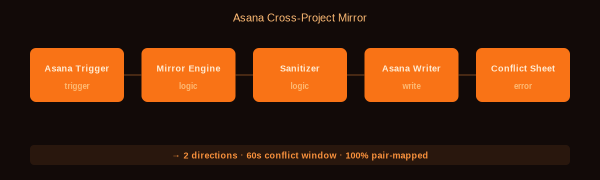
- Trigger: Asana Trigger — Fires on task events (created, updated, commented) in both the internal and the client project. Direction is detected from the source project ID.
- Logic: Mirror Engine — Checks the ID map: known pair → update the other side; unknown task → create the mirror with the field sanitization rules applied, then record the pair.
- Output: Asana Writer — Creates or updates the mirror task: title, status, due date, and comments (with attribution). Internal-only fields (estimates, internal tags) are stripped for the client side.
- Error handling: Conflict Sheet — Two-sided edits within the same 60-second window are logged with both versions instead of being blindly merged. A human resolves in one row.
Node Map
- Asana Trigger (trigger):
n8n-nodes-base.asana - Mirror Engine (logic):
n8n-nodes-base.code - Sanitizer (logic):
n8n-nodes-base.code - Asana Writer (write):
n8n-nodes-base.asana - Conflict Sheet (error):
n8n-nodes-base.googleSheets
Failure Path
The 60-second conflict window exists because Asana webhooks can arrive out of order: a client edit and an internal edit on the same task can land seconds apart. Instead of a last-write-wins that silently drops a client comment, both versions go to the conflict sheet and the mirror pauses for that task only. Asana’s rate limit (150 requests/minute) is respected by batching the ID-map reads.
Deployment Sequence
- Define the sanitization rules — List the field names and tag names that never cross to the client side. This list is the entire security model.
- Import the workflow — Paste the JSON; set both project IDs and the sheet tab.
- Backfill the ID map — One-off run that pairs existing tasks by a shared code (e.g. a project prefix in the title).
- Test the conflict window — Edit the same task on both sides within a minute. Both versions must appear in the conflict sheet.
- Add the first client — Duplicate the workflow per client (one pair of project IDs each). Per-client isolation beats one mega-workflow.
Execution Details
- Asana Trigger Node — Catches task events in both projects and determines direction from the source project ID. Events on unknown projects are ignored.
- Mirror Engine Node — Looks up the task in the ID map. Known pair → prepare an update for the other side. Unknown task → prepare a create with sanitization applied, and queue the map write.
- Sanitizer Node — undefined
- Asana Writer Node — Executes the create or update on the target project, then writes or updates the ID map row in the same run.
- Conflict Sheet Node — undefined
FAQ
Can the client see our internal project?
No. Only the sanitized mirror exists in the client project. Internal fields are stripped before the write, not hidden after — there’s nothing to leak.
What happens to a task the client deletes?
The mirror is archived (not deleted) on the internal side, with a ‘client deleted’ note. Accidental client deletions are recoverable; the internal record is not.
Does it sync attachments?
By default, no — file attachments are excluded from both directions to stay under Asana’s file size and rate limits. Enable per-project if your workflow depends on shared files.
How many projects can one workflow mirror?
The design is one internal + one client per workflow. Agencies typically run one workflow per client — the per-client conflict isolation is the point.
Source
Pattern: webhook→set→code (52 templates), czlonkowski/n8n-mcp (MIT)
System Requirements
Operational Benefits
Trusted by Operators
"Deployed the full OS across 7 client accounts in week one. The 27K template library meant I stopped building workflows from scratch — I search, import, configure credentials, and deploy. Estimated 80+ hours/month saved in workflow development alone. The 15 AI agents replaced $12K/month in contractor overhead."

"The infrastructure architecture is production-grade. I've run 15,000+ workflow executions over 90 days with zero critical failures. The error-handling patterns (retry logic, dead-letter queues, Slack alerting) are already wired in. I spent 3 years building similar tooling in-house — this saved me 6+ months of engineering."

Free: Top 10 n8n Workflows
Get 10 industrial-grade n8n blueprints — ready to import into any instance. Save 10h/week with these ready-to-deploy automations.
- Industrial-grade n8n blueprints
- Recursive Claude subagent instructions
- Localhost deployment guide
- Lifetime update protocol