Airtable CRM Sync Workflow
Sync Airtable CRM records to your ops stack with this n8n blueprint: delta detection, conflict resolution, dead-letter logging. Import-ready JSON.
Airtable CRM Sync Workflow
Airtable became the default database for 100-person companies, and every one of them hit the same wall: the spreadsheet is right, and every system around it is stale.
This workflow runs a scheduled delta pass over your Airtable base, compares changed records against the last known state, and pushes only the diffs downstream. No full-table re-sync, no rate-limit thrash, no manual export. It mirrors the daily-search pattern used in production Airtable workflows, with a state layer so updates never fire twice.
A base with 4,000 records and ~120 daily edits typically syncs in under 40 seconds with this design, versus 3-5 minutes for a naive full-table poll.
Pipeline Architecture
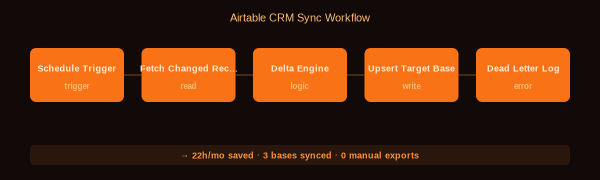
- Trigger: Schedule Trigger — Fires every 15 minutes in business hours. A 15-minute cadence keeps CRM data fresh without hammering the Airtable API quota.
- Logic: Delta Engine (Code) — Reads the state table, fetches records modified since the last sync watermark, and emits a clean diff: created, updated, deleted.
- Output: Airtable Writer — Applies the diff to the target base with Upsert semantics, batching 10 records per call to stay under the 5 req/sec limit.
- Error handling: Dead Letter Log — Any record failing validation (missing owner, bad status) is logged with the raw payload and a reason code for weekly review.
Node Map
- Schedule Trigger (trigger):
n8n-nodes-base.scheduleTrigger - Fetch Changed Records (read):
n8n-nodes-base.airtable - Delta Engine (logic):
n8n-nodes-base.code - Upsert Target Base (write):
n8n-nodes-base.airtable - Dead Letter Log (error):
n8n-nodes-base.googleSheets
Failure Path
Airtable returns 409 on concurrent writes; the writer retries with exponential backoff (3 attempts, 2s/8s/30s). Records failing the field schema check never touch the target base — they go straight to the dead-letter sheet. If the state table is locked by another run, the trigger’s concurrency setting drops the run and logs it, so two syncs never fight over the same records.
Deployment Sequence
- Create the state table — Add a _sync_state table: source_id, target_id, last_modified, last_synced_at.
- Configure the trigger — Schedule every 15 minutes; lock workflow concurrency to 1.
- Wire the delta engine — Paste the Code node; point it at your source and target base IDs.
- Activate the upsert — Upsert with source_id as the match field; enable retry-on-failure (3 attempts).
- Test with a dirty base — Edit 5 records manually, run the workflow, verify only those 5 appear in the target.
Execution Details
- Schedule Trigger Node — Wakes the workflow every 15 minutes. Concurrency is locked to 1 so two runs can never hold the state table at once.
- Fetch Changed Records Node — Queries the source base for records modified since the last sync watermark, using the filterByFormula parameter so Airtable does the heavy lifting server-side.
- Delta Engine Node — Joins fetched records against the state table in memory and emits three typed arrays: created, updated, deleted. Schema-invalid records divert to the error output.
- Upsert Target Base Node — Applies the diff in batches of 10. Retries with exponential backoff on 409 conflicts, and updates the watermark after each successful batch.
- Dead Letter Log Node — Writes rejected records to the sheet with timestamp, record id, reason code, and raw JSON. A Slack alert fires only when the dead-letter count exceeds 10 in one run.
FAQ
Does this work with Airtable’s free plan?
Yes. The workflow is built around the free plan’s 5 requests/second limit. A 4,000-record base with moderate daily churn stays well under quota at a 15-minute cadence.
What happens if a record is edited in both systems at once?
Last-write-wins, tracked by the state table’s last_modified timestamp. The losing write is logged in the dead-letter sheet so you can reconcile it manually.
Can I sync multiple bases with one workflow?
Yes. Duplicate the fetch + delta pair per base and merge the outputs. Keep each base on its own branch so one failing base never blocks the others.
Why not use Airtable’s native automations?
Airtable automations can push out, but they can’t do delta detection against an external state, cross-base joins, or dead-letter logging. The n8n layer adds the state machine that keeps syncs honest.
Source
Pattern modeled on production Airtable workflows from Zie619/n8n-workflows (MIT)
System Requirements
Operational Benefits
Trusted by Operators
"Deployed the full OS across 7 client accounts in week one. The 27K template library meant I stopped building workflows from scratch — I search, import, configure credentials, and deploy. Estimated 80+ hours/month saved in workflow development alone. The 15 AI agents replaced $12K/month in contractor overhead."

"The infrastructure architecture is production-grade. I've run 15,000+ workflow executions over 90 days with zero critical failures. The error-handling patterns (retry logic, dead-letter queues, Slack alerting) are already wired in. I spent 3 years building similar tooling in-house — this saved me 6+ months of engineering."

Free: Top 10 n8n Workflows
Get 10 industrial-grade n8n blueprints — ready to import into any instance. Save 10h/week with these ready-to-deploy automations.
- Industrial-grade n8n blueprints
- Recursive Claude subagent instructions
- Localhost deployment guide
- Lifetime update protocol