ActiveCampaign Segment Builder
Keep ActiveCampaign segments honest: sync CRM events in, recalculate membership by behavior, and purge dead contacts. n8n JSON included.
ActiveCampaign Segment Builder
Your email segments were built by hand in 2024, and they’ve been lying to you ever since — 40% of the ‘engaged’ segment hasn’t opened anything in 8 months.
This workflow makes segments a computed property instead of a manual list. CRM events (purchases, plan changes, support tickets) flow in, the behavior engine recalculates which segment each contact belongs to, and a hygiene pass suppresses contacts who’ve been dark for a defined window. The segments stay true without anyone touching the UI.
Rebuilding segments from behavior instead of trusting the label typically recovers 15-25% of suppressed-but-alive contacts and cuts email to truly-gone addresses — both of which move deliverability.
Pipeline Architecture
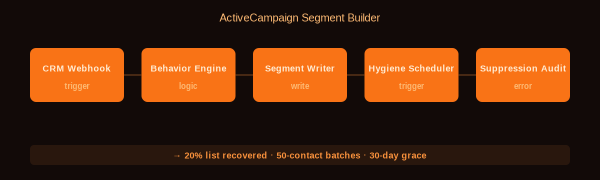
- Trigger: Webhook (CRM events) — Your CRM POSTs purchase, upgrade, and ticket events to one URL. A nightly schedule ping runs the hygiene pass.
- Logic: Behavior Engine — Maintains a per-contact score: recency, frequency, monetary. Maps the score to segment IDs and computes the diff against current membership.
- Output: Segment Writer — Applies membership changes in batches of 50, respecting ActiveCampaign’s API limits. Suppressions are logged before they’re applied.
- Error handling: Suppression Audit — Every suppression (and reactivation) is written to the audit sheet with the triggering score. Reversible by one sheet row.
Node Map
- CRM Webhook (trigger):
n8n-nodes-base.webhook - Behavior Engine (logic):
n8n-nodes-base.code - Segment Writer (write):
n8n-nodes-base.activeCampaign - Hygiene Scheduler (trigger):
n8n-nodes-base.scheduleTrigger - Suppression Audit (error):
n8n-nodes-base.googleSheets
Failure Path
ActiveCampaign’s contact API rejects batches over 50 contacts, so the writer chunks automatically. A contact that exists in ActiveCampaign but not in your CRM gets a 30-day grace window before suppression — sync lag between systems is a fact of life, and the workflow treats it as one instead of a bug.
Deployment Sequence
- Define the segments — In ActiveCampaign, create the target segments as empty containers — the engine fills them, it doesn’t create them.
- Import the workflow — Paste the JSON; set the segment ID map (score band → segment ID) in the config block.
- Wire the CRM webhook — Point your CRM’s event notifications at the n8n URL. Test with one real purchase event.
- Calibrate the dark window — Default 120 days without open or click. B2B with long cycles: 180. E-commerce: 90.
- First hygiene run — Run once in shadow mode (audit-only, no suppression) and review the suppression list before switching the writer on.
Execution Details
- CRM Webhook Node — Receives purchase, upgrade, and ticket events. Normalizes them into a single {contact, event_type, value, ts} shape before anything else runs.
- Behavior Engine Node — Updates the contact’s recency/frequency/monetary scores, recomputes the target segment, and diffs it against current ActiveCampaign membership.
- Segment Writer Node — Applies the membership diff in 50-contact batches. Additions and removals are separate calls — a removal never rides along in an add batch.
- Hygiene Scheduler Node — Nightly at 02:00, scans for contacts past the dark window, applies the grace check, and queues suppressions for the writer.
- Suppression Audit Node — Writes every suppression and reactivation with the triggering score and timestamp. The sheet is the undo mechanism.
FAQ
Can I keep my hand-built segments?
Yes — the engine only writes to the segment IDs you configure. Everything else in your ActiveCampaign account is untouched.
What if a suppressed customer reactivates?
Any incoming CRM event for a suppressed contact triggers an automatic reactivation (one API call), logged in the audit sheet with the event that revived them.
How often should the hygiene pass run?
Nightly is the default. It’s cheap — a score scan, no API writes unless something crosses the window — so more frequent runs cost little and shrink the suppression lag.
Does this work with ActiveCampaign’s free plan?
The API limits make batch sizes of 50 the ceiling, which the writer respects. The workflow is designed for the plan you have, not a hypothetical enterprise tier.
Source
Pattern: webhook→set→httpRequest (74 templates), czlonkowski/n8n-mcp (MIT)
System Requirements
Operational Benefits
Trusted by Operators
"Deployed the full OS across 7 client accounts in week one. The 27K template library meant I stopped building workflows from scratch — I search, import, configure credentials, and deploy. Estimated 80+ hours/month saved in workflow development alone. The 15 AI agents replaced $12K/month in contractor overhead."

"The infrastructure architecture is production-grade. I've run 15,000+ workflow executions over 90 days with zero critical failures. The error-handling patterns (retry logic, dead-letter queues, Slack alerting) are already wired in. I spent 3 years building similar tooling in-house — this saved me 6+ months of engineering."

Free: Top 10 n8n Workflows
Get 10 industrial-grade n8n blueprints — ready to import into any instance. Save 10h/week with these ready-to-deploy automations.
- Industrial-grade n8n blueprints
- Recursive Claude subagent instructions
- Localhost deployment guide
- Lifetime update protocol