Pinterest Automation Playbook: How to Build an AI-Powered Pin Engine with n8n

SynthOperator Systems Team
AI Systems Engineers
Released
July 21, 2026
Duration
11 min read
Step-by-step guide to building a Pinterest automation system with n8n workflows, AI image generation, keyword clustering, and scheduled publishing. Turn Pinterest into an evergreen traffic machine.
// Key_Takeaways
- ▹ Pinterest is a visual search engine, not a social network — Pins drive traffic for 6-12+ months.
- ▹ The AI Pin Engine automates 4 stages: keyword discovery, image generation, description/tags, and scheduled publishing.
- ▹ 5-10 fresh Pins per day across 3 windows of high activity is the formula for algorithm visibility.
- ▹ Pinterest's 2026 ranking signals: Pin quality, Pinner authority, keyword relevance, and recency.
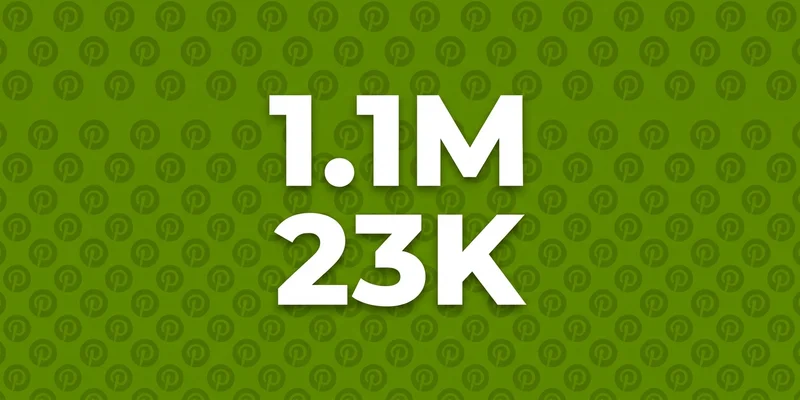
- ▹ Real accounts following this system generate 1.1M monthly impressions and 23K outbound clicks.
01
Index_Structure
↓
Index_Structure
Why Pinterest Needs Automation
Pinterest isn’t a social network — it’s a visual search engine with 500M+ monthly active users actively searching for solutions. Unlike Instagram or TikTok, Pins drive traffic for months or even years. One well-optimized Pin can generate clicks for 6-12 months after publication.
But consistency is the killer. Research shows high-performing brands publish 5-10 fresh Pins per day to maintain algorithm visibility. Doing that manually is unsustainable for an agency owner running multiple accounts.
The solution is an AI-powered Pin Engine: an automated system that researches keywords, generates visuals, writes descriptions, and publishes on a schedule. And n8n is the perfect platform to build it.
How the Pinterest Algorithm Works in 2026
Before building automation, understand what the algorithm actually rewards. Pinterest’s 2026 ranking system evaluates four signals:
- Pin quality: saves, clicks, zooms, and comments. High-quality vertical visuals (2:3 ratio) with clear text overlays perform best.
- Pinner quality: your account’s authority based on posting consistency and audience engagement. Real-time processing means engagement with one Pin immediately surfaces similar content from your account.
- Relevance: keyword matching between your Pin title, description, board topic, and the user’s search query. Long-tail keywords carry more weight.
- Recency: fresh Pins get an initial visibility boost. A steady flow of new URLs strengthens your domain quality over time.
The key insight: fresh, keyword-optimized content on a consistent schedule is the formula. Automation handles the consistency; AI handles the optimization.
The AI Pin Engine Architecture
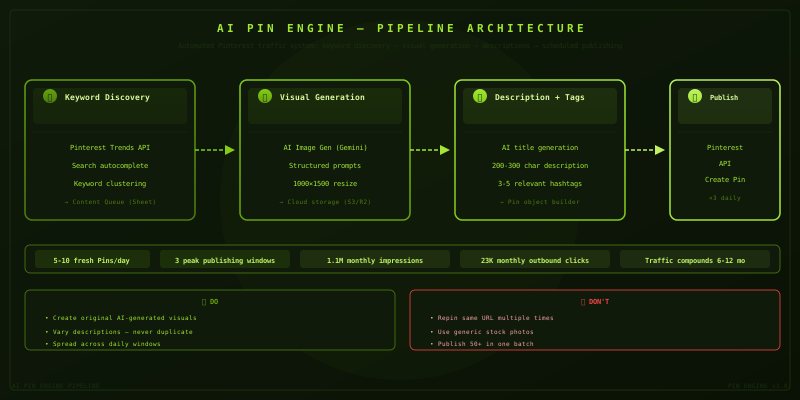
The system has four stages, each automated via an n8n workflow:
Stage 1: Keyword Discovery
Pinterest Trends and the search autocomplete API reveal exactly what your audience is searching for.
Workflow:
- Trigger: Weekly schedule (Monday 8 AM)
- Node: HTTP Request to Pinterest Trends API for your niche keywords
- Node: Code node to cluster keywords by search volume and growth trend
- Node: Store results in a Google Sheet as your content queue
Pro tip: Focus on long-tail, high-intent keywords. “AI workflow automation for agencies” converts better than “automation” alone. Use Sprout Social’s ViralPost or Pinterest Trends timing data to identify when your audience is most active — Pinterest engagement peaks between 8 AM and 4 PM on weekdays.
Stage 2: Visual Generation
Each keyword cluster needs a unique, high-quality visual. AI image generation (Gemini 3 Pro Image or DALL-E 3) creates scroll-stopping Pins at scale.
Workflow:
- Trigger: New row added to your keyword sheet
- Node: AI image generation model with a structured prompt template
- Node: Image processing (resize to 1000x1500, add text overlay)
- Node: Store in cloud storage (S3 or cloudflare R2)
Prompt template for Pin images:
Create a vertical Pinterest Pin image (2:3 ratio) for:
  Topic: {keyword_cluster}
  Audience: Agency owners and marketing operators
  Style: Clean, modern, professional with bold text overlay
  Colors: Dark navy background with coral accent
  Text overlay: "{keyword}"
  No logos. No watermarks. High contrast for readability.
Stage 3: Description and Hashtag Generation
Each Pin needs a title, description, and hashtags optimized for Pinterest search.
Workflow:
- Trigger: Image generated successfully
- Node: AI prompt to write a Pin title with primary keyword
- Node: AI prompt to write a 200-300 character description with 2-3 keyword phrases
- Node: Generate 3-5 relevant hashtags
- Node: Combine with the image URL into a Pin object
Title formula: Primary keyword + benefit. Example: “AI Agency Automation: How to Scale Without Hiring”.
Description structure: Context + keyword phrase + call-to-action. Pinterest reads titles, descriptions, board topics, and linked domains to determine relevance.
Stage 4: Scheduled Publishing
Pins that perform well in the first few hours signal quality to the algorithm. Timing matters.
Workflow:
- Trigger: Daily at 9 AM, 12 PM, 3 PM (spaced across peak hours)
- Node: Pull next Pin from the queue (FIFO from Google Sheet)
- Node: Pinterest API — Create Pin with image URL, title, description, hashtags, and link
- Node: Mark Pin as published with timestamp
- Node: Log to analytics sheet
Publish frequency: Start with 3-5 Pins per day across 3 windows. Scale to 10 as your content queue grows. Spacing Pins across windows of high activity is smarter than posting them all at once.
Putting It Together: The Complete n8n Workflow
Here’s how the full system connects in n8n:
[Schedule Trigger (Weekly)] → [Pinterest Trends API] → [Keyword Clustering (Code Node)]
    ↓
[Google Sheet (Content Queue)]
    ↓
[Schedule Trigger (Daily × 3)] → [Read Next from Queue]
    ↓
[AI Image Generation] → [Image Processing (Sharp)] → [Cloud Storage]
    ↓
[AI Description Generator] → [Pin Object Builder]
    ↓
[Pinterest API - Create Pin] → [Log to Analytics]
Advanced Tactics
Video Pins
Video Pins hold attention longer and get stronger engagement signals. A 2026 study found people retain 95% of a message from video vs 10% from text.
Extend your workflow to generate short video Pins:
- AI script generation for 30-60 second tutorials
- Text-to-speech voiceover (ElevenLabs or OpenAI TTS)
- Combine with screenshots or screen recordings
- Upload as video Pin via Pinterest API
Idea Pins (Multi-Page)
Idea Pins (formerly Story Pins) are heavily favored by the algorithm. Build workflows that transform long-form blog posts into 3-5 page Idea Pin sequences:
- Page 1: Hook and title
- Page 2-4: Key points with visuals
- Page 5: Call to action
A/B Testing at Scale
Create two variants of each Pin (different image or headline) and track which performs better. Pinterest analytics show impressions, saves, and click-through rates. The winning variant gets republished, the loser gets retired.
Avoiding Automation Pitfalls
Pinterest’s 2025-2026 algorithm updates reward authentic content and engagement quality over raw quantity. Automation should never mean spam.
Do:
- Create original visuals (AI-generated is fine, but unique each time)
- Vary descriptions between Pins (never duplicate)
- Space publishing across the day (9 AM, 12 PM, 3 PM are peak windows)
- Maintain organized niche boards
- Monitor analytics and iterate
Don’t:
- Repin the same URL multiple times
- Use generic stock photos
- Publish 50 Pins in one batch
- Ignore keyword research
The ROI of a Pin Engine
The exact same system we described above generates 1.1M monthly impressions and 23K outbound clicks for real accounts following this playbook (source: 2026 r/Pinterest community data).
For an agency owner:
- 3-5 Pins/day = ~600-1,000 monthly outbound clicks
- At 2-5% conversion to lead, that’s 12-50 leads per month
- Each Pin continues driving traffic for 6-12 months
Automation turns Pinterest from a time-sink into a compounding traffic asset.
Getting Started
You don’t need to build everything at once. Start with Stage 4 (scheduled publishing) using manually created content. Add Stage 3 (description generation) once you have volume. Layer in Stage 1 and 2 (keyword discovery and image generation) as your system matures.
The n8n workflows for this system are included in the Pinterest Automation Tool and the full n8n Automation OS.
From the Vault
// Frequently_Asked_Questions
Can I automate Pinterest without getting banned? ↓
Yes. The key is to use Pinterest's official API for publishing and focus on creating high-quality, original content. Avoid bot-like behavior like rapid repinning or duplicate content. Pinterest's algorithm rewards authentic, high-quality Pins -- automation should focus on efficiency, not spam.
How many Pins should I publish per day? ↓
High-performing brands publish 5-10 fresh Pins per day, spaced across windows of high activity. Quality always beats quantity. Consistency matters more than volume.
Does Pinterest still drive traffic in 2026? ↓
85% of weekly Pinterest users say they've purchased something from a Pin. Pinterest is a visual search engine, not a social network -- content drives traffic for months or years, unlike Instagram or TikTok where content dies in 48 hours.
What are the key ranking signals for Pinterest in 2026? ↓
Four main signals: Pin quality (engagement and popularity), Pinner quality (account authority and consistency), relevance (keyword matching), and recency (fresh content gets an initial boost).
// About_the_Author
SynthOperator Systems Team
AI Systems Engineers
Specializing in high-performance automation architecture and agentic workflow design.