How to Use Pinterest to Drive Traffic in 2026: The Complete Guide for SaaS & Digital Product Sellers

SynthOperator Systems Team
AI Systems Engineers
Released
June 11, 2026
Duration
12 min read
Learn how to use Pinterest to drive traffic to your website, SaaS, or digital products. Proven strategies, SEO tips, and automation tactics that actually work in 2026.

// Key_Takeaways
- ▹ Pinterest is a visual search engine with 500M+ MAU — content drives traffic for months or years, unlike Instagram/TikTok.
- ▹ Optimize profile with keyword-rich name/bio, claim your website, and build SEO-optimized boards with long-tail keywords.
- ▹ Use 2:3 ratio vertical pins with bold text overlays — educational, listicle, and comparison pin types perform best.
- ▹ The 4-stage Pinterest funnel: Awareness → Interest → Decision → Action, with specific content for each stage.
- ▹ Safe automation: pin 5-15 times daily with human-like delays, fresh URLs, and spread across peak hours.
01
Index_Structure
↓
Index_Structure
Introduction: Why Pinterest Is Still a Traffic Goldmine in 2026
Pinterest isn’t just a social network—it’s a visual search engine with over 500 million monthly active users actively searching for solutions. Unlike Instagram or TikTok, where content dies in 48 hours, Pinterest pins drive traffic for months or even years.
For SaaS founders, digital product creators, and agency owners, Pinterest represents an underpriced attention channel. While competitors burn budget on saturated Facebook and Google Ads, smart marketers are building evergreen traffic funnels on Pinterest.
In this guide, you’ll learn exactly how to use Pinterest to drive traffic—from profile optimization to pin creation, SEO strategy, and automation. Let’s build your traffic machine.

1. Optimize Your Pinterest Profile for Search
Before you pin a single image, your profile needs to be discoverable. Pinterest’s algorithm scans your profile name, description, and boards to understand what you’re about.
Profile Name Formula
[Your Niche] + [Outcome You Deliver]
Example: “SaaS Marketing | Pinterest Traffic Strategies”
Bio Optimization
Include your primary keyword naturally in the first 125 characters (this is what shows in search results):
“I help SaaS founders and digital product sellers drive traffic from Pinterest with automated pinning systems and SEO-optimized content.”
Claim Your Website
Go to Settings → Claimed Accounts and verify your domain. This unlocks:
- Rich Pins (auto-sync metadata)
- Pinterest Analytics for your site
- Enhanced trust signals for the algorithm

2. Build SEO-Optimized Boards
Boards are Pinterest’s equivalent of website categories. They signal topical authority to the algorithm.
Board Naming Strategy
Use keyword-rich titles that match actual search queries:
| Bad | Good |
|---|---|
| ”My Stuff" | "Pinterest Marketing Strategies" |
| "Cool Tools" | "SaaS Growth Hacks" |
| "Random" | "Digital Product Marketing” |
Board Descriptions
Write 2-3 sentences using long-tail keywords:
“This board collects the best Pinterest marketing strategies for SaaS companies looking to drive organic traffic and automate their content distribution. Includes guides on Pinterest SEO, pin automation, and traffic analytics.”
Pro tip: Pinterest scans the first 50 words heavily. Front-load your keywords.

3. Create Pins That Actually Get Clicked
The average Pinterest user sees thousands of pins daily. Yours needs to stop the scroll and earn the click.
Pin Design Formula for Traffic
| Element | Best Practice |
|---|---|
| Aspect ratio | 2:3 (1000 x 1500px) — highest engagement |
| Headline | Promise + specificity: “Get 10K Monthly Visitors from Pinterest” |
| Typography | Bold, readable at small sizes — max 2 fonts |
| Color contrast | Dark text on light background (or inverse) |
| Branding | Subtle logo in corner — don’t distract from CTA |
| CTA | Implied: “Learn how →” or “Free guide inside” |
The 3 Pin Types That Drive Traffic
1. Educational Pins
- “How to [Achieve Result] in [Timeframe]”
- Links to blog posts, tutorials, or lead magnets
2. Listicle Pins
- “7 Tools to Automate Pinterest Marketing”
- High save rate = algorithm boost
3. Comparison Pins
- “Manual Pinning vs. Automation: Time Saved”
- Perfect for SaaS/digital products

4. Master Pinterest SEO: The Hidden Ranking Factors
Pinterest functions like Google. Understanding its search algorithm is how you get traffic from Pinterest consistently.
Keyword Research for Pinterest
Use these free methods:
- Pinterest search bar: Type your niche, note autocomplete suggestions
- Trends tool: trends.pinterest.com — rising queries
- Competitor boards: See what ranks for your target keywords
Where to Place Keywords
| Location | Weight | Action |
|---|---|---|
| Pin title | High | Front-load primary keyword |
| Pin description | High | Natural use, 2-3 keywords max |
| Alt text | 🟡 Medium | Describe image + include keyword |
| Board title | 🟡 Medium | Exact match when possible |
| Profile name | 🟢 Low | Include if natural |
5. The Pinterest Traffic Funnel: From Pin to Purchase
Random pinning doesn’t build business. You need a strategic funnel.
The 4-Stage Pinterest Funnel

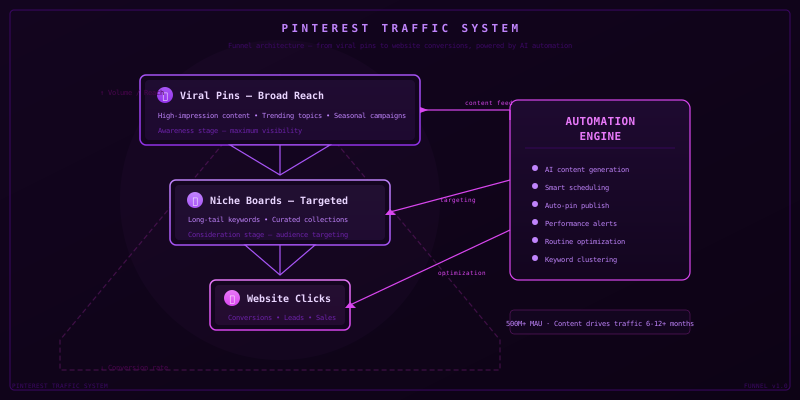
Stage 1 — Awareness: Broad listicles (“10 Ways to Market Your SaaS”) Stage 2 — Interest: How-to content (“How to Set Up Pinterest Automation”) Stage 3 — Decision: Social proof (“How We Got 50K Pinterest Views in 30 Days”) Stage 4 — Action: Direct product pins (“Pinterest Automation Suite — Get It Now”)

6. Automate Your Pinterest Traffic (Without Getting Banned)
Consistency is the #1 driver of Pinterest growth. But manual pinning is unsustainable.
Safe Automation Rules
| Do This | Avoid This |
|---|---|
| Pin 5-15 times daily, spread out | Bulk upload 50 pins at once |
| Mix fresh pins with repins | Only repin others’ content |
| Use human-like delays between actions | Bot-like speed (1 pin/second) |
| Rotate between 3-5 pin designs per URL | Same image, same URL, repeatedly |
| Schedule during peak hours (8-11 PM) | Post at random times |
Recommended Infrastructure
To achieve the best results without risking your account, we recommend the Pinterest Automation Suite. It uses a dedicated Python agent to mimic human behavior while publishing 24 pins per day.

7. Analyze, Iterate, and Scale
What gets measured gets improved. Track these metrics monthly:
| Metric | Target | Tool |
|---|---|---|
| Monthly views | +20% MoM | Pinterest Analytics |
| Outbound clicks | +15% MoM | Pinterest Analytics |
| Save rate | >2% | Pinterest Analytics |
| Website traffic from Pinterest | +10% MoM | Google Analytics 4 |
| Conversion rate | >1.5% | Your analytics |

Conclusion: Your Pinterest Traffic Starts Today
Pinterest is the only platform where content you create today can drive traffic in 2027. For SaaS founders and digital product sellers, that’s compound interest on your time.
The strategy is simple:
- Optimize your profile and boards for search
- Create scroll-stopping pins with clear value
- Publish consistently with SEO in mind
- Automate safely to maintain momentum
- Analyze and iterate monthly
Ready to automate your Pinterest traffic? Check out our Pinterest Automation Suite — the same system we use to publish optimized pins daily without manual work.

From the Vault
// Frequently_Asked_Questions
How long does it take to see results from Pinterest? ↓
Most accounts see initial traffic within 2-4 weeks of consistent daily pinning. Unlike social platforms, Pinterest content compounds — pins from months ago can still drive traffic today.
Can I use Pinterest for B2B/SaaS marketing? ↓
Yes. Pinterest users actively search for solutions, tools, and educational content. B2B topics like 'project management templates' or 'automation workflows' perform well on the platform.
How many pins should I create per day? ↓
Start with 5-10 fresh pins per day. Quality matters more than quantity. Space them across 3 windows of high activity (8-11 PM is peak).
Will automation get my account banned? ↓
Safe automation that uses Pinterest's official API, creates original content, and mimics human posting patterns will not trigger bans. Avoid duplicate content, rapid actions, and bulk publishing.
// About_the_Author
SynthOperator Systems Team
AI Systems Engineers
Specializing in high-performance automation architecture and agentic workflow design.